Yoosee
- 3.7
- Rating
- 50.00M
- Installs
- Free
- Price

 Analysis by App-foxy
Yoosee is a free video and camera-monitoring app from Gwell, and I found its strongest appeal in the way it brings remote viewing into an ordinary phone workflow. Rather than treating it like a general video editor or entertainment player, I see it as a practical tool for checking a compatible camera, keeping an eye on a room, or looking in on a familiar place when I am away. Its store summary, “Smarter AI You Can See,” points toward that visual, connected-camera purpose, while the short store description simply identifies it as Yoosee.
I approached it as an app I might actually keep on my phone, not as something to open once and forget. That matters because camera apps are judged less by flashy presentation and more by whether checking a live view feels straightforward when I am busy. Yoosee has a broad audience: it is free to download, rated for Everyone, and available on Android devices running version 7.0 or later. The current release is 6.42.1, so compatibility is worth checking before installing on an older handset.
How Yoosee fits into everyday camera monitoring
In practical terms, Yoosee belongs to the video players and editors section, although my experience with it is closer to remote camera viewing than to editing clips. I would use it when I need a phone-based window into a connected space. That could mean checking whether a child has arrived home, looking at a pet’s area during a lunch break, or confirming what is happening in a room before calling someone nearby.
You May Also Like

 Blood Strike: 2.5 Anniversary
Blood Strike’s Loadouts Turn Every Drop Into a Tactical Gamble
A close look at Blood Strike’s custom loadouts: how fast access to signature weapons reshapes its battle royale rhythm, rewards preparation, and narrows the gap between fights.

 Pandora - Music & Podcasts
Pandora’s Music Is Easy to Start, but Harder to Recover
Pandora’s strength is its low-effort path from a seed to a station. Its weak spot is how much confidence it asks you to place in connection, setup, and quiet recovery.

 8 Ball Pool
 Is Built on Rivalries, Rematches, and Routine
A close look at the rivalries, rematches, shared routines, and unanswered safety questions that turn a quick pool match into a persistent mobile community.

 Samsung Music
’s Quiet Strength Is Playing What You Already Own
Its reach comes less from spectacle than from dependable access to a personal library. That simplicity is both the app’s strongest retention engine and its ceiling.

 AccuWeather: Weather Radar
AccuWeather Review: A Quick, Clear Forecast for Everyday Decisions
For everyday plans, the best forecast is the one you can understand quickly. AccuWeather makes rain timing, radar, and local conditions easy to act on, with a few trade-offs.

 Hill Climb Racing
Why Hill Climb Racing Still Turns Crashes Into One More Run
A tiny car, a bumpy hill and one more upgrade: Hill Climb Racing keeps resurfacing because its simple chaos makes every near-miss feel personal.
More From Our News Desk



The most useful way to think about it is as a companion for a compatible camera setup. The phone is the viewing and control point; the value comes from being able to reach that visual feed without standing beside the camera. This is different from opening a normal gallery or video editor, where the content already exists on the device. Yoosee is aimed at the moment when I need to check something remotely.
That distinction also sets a sensible expectation. I would not install it expecting a full editing suite, a social video feed, or a replacement for a dedicated security system. Its role is narrower and, for the right household, more useful because of that focus. The interface has to support quick checking rather than creative production.
The cost is simple, but the surrounding setup still matters
Yoosee is free, which removes the first barrier for someone who wants to try the app. I can install it without paying an upfront purchase price, and that makes experimentation reasonable if I already have a compatible camera or am deciding whether this style of monitoring suits me. The free access is the clearest value point here: I am not committing money merely to see whether the basic experience fits my routine.
Still, “free” applies to the app itself, not automatically to every part of a camera-monitoring setup. A phone cannot create a remote view on its own; I would still need the relevant camera equipment and a working connection between the camera, app, and network. Those surrounding requirements shape the real cost of using Yoosee, even though the download has no listed price.
I also would not confuse free access with a promise that every advanced capability is included forever or that every camera behaves identically. Camera apps can depend heavily on the hardware they connect to. My practical advice is to treat the free app as an entry point, then confirm that the specific camera model and the functions I care about work together before building an important routine around them.
What I found useful in the daily workflow
The biggest benefit is convenience. When a camera is already in place, opening a phone app is much easier than walking across the house, calling another person, or waiting until I return. That convenience becomes especially clear in small checks that happen several times a day. I might want to see whether a delivery was left in a particular area, confirm that a pet is inside, or check a room before turning off a light.
A realistic example is a parent working from home while an older relative rests in another room. Instead of repeatedly interrupting them, I can use a quick visual check when appropriate. The app does not replace direct communication or personal care, but it can reduce unnecessary trips and provide reassurance. The same workflow can help someone who wants to check a quiet office, a storage area, or a familiar entrance while away.
Another useful habit is to decide in advance what I am checking. If I open the app without a specific question, remote monitoring can become distracting. If I know I am checking whether a pet is in its bed or whether a room is empty, the app becomes a quick tool rather than another endless notification source. That small discipline improves the experience more than repeatedly changing settings.
The “AI” wording in the store summary may attract people looking for smart visual assistance, but I would judge the app by the concrete task in front of me rather than by that phrase alone. The important question is whether the connected view helps me make a decision quickly. For my purposes, a clear, dependable look at the relevant space matters more than a broad promise of intelligence.
Where the experience can become frustrating
Remote viewing always introduces dependencies that a local video file does not have. The camera must be available, the phone must be able to reach it, and the connection must behave well enough for the view to be useful. If any part of that chain is unreliable, the app can feel slow or unhelpful even when the phone itself is working perfectly.
That is why I would not rely on Yoosee as my only answer for urgent safety decisions. A phone screen is useful for checking a familiar situation, but it is not a substitute for direct help, a purpose-built alarm arrangement, or an in-person response. The more serious the consequence of missing something, the less comfortable I would be treating a free mobile app as the sole safeguard.
There is also a learning curve for people who are not used to connected devices. Pairing a camera, understanding which device is being viewed, and keeping track of the correct account or access details can be more effort than opening a normal video app. I would set everything up when I have time, not five minutes before leaving the house and expecting remote access to work immediately.
Privacy is another area where I would be deliberate. A camera pointed at a private room affects everyone who may appear in that space, not just the person who installed the app. I would place the camera carefully, explain its use to household members, and avoid treating remote visibility as permission to watch people without their knowledge. The app can make viewing easier, which makes responsible placement and use even more important.
Three practical habits that improve the experience
First, I would name or organize camera views according to places rather than vague device labels. A location-based habit makes a quick check less error-prone, especially when several cameras are involved. Before relying on a view, I would also open it from the same place where I expect to use it later. A camera that works perfectly on the home network may not feel the same when I am away.
Second, I would test the exact routine I care about instead of assuming that installation equals readiness. If my goal is checking a pet while at work, I would try that from outside the home network. If my goal is checking a room at night, I would test it under those lighting conditions. This reveals practical friction early, including whether I can identify the correct view quickly and whether the result is clear enough for the decision I need to make.
Third, I would keep access limited to people who genuinely need it. Sharing a camera view casually can create confusion about who is responsible for monitoring and can expose more of a home or workplace than intended. A smaller, clearly agreed group is easier to manage than passing access around whenever someone asks for it.
These are not glamorous features, but they are the difference between an app that is installed and an app that becomes dependable. Yoosee works best when I give its camera relationship a little planning. The free download makes trying it easy; the quality of the final routine depends on how thoughtfully the surrounding setup is handled.
How it compares with familiar alternatives
Compared with a standard video player, Yoosee is more useful for live checking and less useful for simply watching files already stored on the phone. If I want to trim a clip, add creative effects, or assemble a polished video, I would choose a dedicated editor instead. Yoosee’s value is not in replacing those tools; it is in connecting viewing to a remote camera context.
Compared with a camera manufacturer’s own app, the decision is more specific. If my camera is designed around another ecosystem, that manufacturer’s software may offer a smoother pairing process or more complete device-specific controls. Yoosee makes more sense when the hardware I own is intended to work with it. I would not choose it solely because it is free without checking that basic compatibility first.
Compared with a professional monitoring service, Yoosee is a lighter and more hands-on option. I would be responsible for checking the app and responding to what I see. That can be exactly what I want for a pet, a room, or a small personal setup, but it is not the same as paying for a staffed service or a managed security solution. The free price makes it attractive for casual use, while the lack of a professional response model is a reason to look elsewhere for higher-stakes protection.
Its scale is notable: the app has passed fifty million installs, with an average rating of 3.7 from around 309 thousand ratings. That suggests a substantial user base, but I would read the rating as a reminder to keep expectations practical rather than as a guarantee that every setup will be smooth. Camera compatibility, network conditions, and personal expectations can strongly affect whether someone enjoys the experience.
Who is most likely to get real value
I think Yoosee is a good fit for people who already have, or are considering, compatible camera hardware and want a free mobile viewing option. It suits households that need occasional visual checks rather than a complex professional command center. Pet owners, families, small office users, and people who want to check a familiar space while away are the most obvious candidates.
It can also help someone who values convenience but does not want to learn a large security platform. The app’s appeal is strongest when the task is simple: open the phone, select the relevant view, look carefully, and close it again. If that describes my need, the free entry point is worthwhile.
I would skip it if I am looking for a conventional video editor, a media library, or a social platform for publishing clips. I would also look for another solution if I need guaranteed professional monitoring, advanced business surveillance management, or a system whose reliability is critical to personal safety. In those cases, a dedicated alternative may justify its cost or complexity.
My verdict after weighing the free value
Yoosee delivers sensible value when I judge it for what it is: a free app for connecting a phone to a compatible camera-viewing routine. I like that it can turn small, repeated checks into a quick glance instead of a trip across the building. The broad install base shows that this use case resonates with many people, while the 3.7 average tells me to approach it with realistic expectations rather than assume a flawless experience.
My recommendation is to try it when the camera relationship is clear, the intended use is low-risk, and I am willing to test the setup before depending on it. I would install it for checking a pet, a room, or a familiar space, then evaluate whether the view is convenient enough in the places where I actually need it. That practical trial costs nothing at the app level and gives a better answer than the store summary alone.
My bottom line: Yoosee is worth trying for free camera access, but its value comes from the complete setup, not from the download by itself. I would recommend it to a friend who wants straightforward remote viewing and already has suitable hardware. I would point that same friend toward a dedicated camera ecosystem or professional service when reliability, specialized controls, or formal monitoring matter more than free access.
Developed by Gwell and available to Everyone on supported Android devices, it remains an approachable option for this particular job. Just keep the boundaries clear: use it as a convenient visual check, protect the privacy of the people in view, test it away from home before trusting the routine, and choose a more specialized solution when the situation demands more than a phone-based look.
FAQs for Yoosee
01What is Yoosee, and what are its primary features?
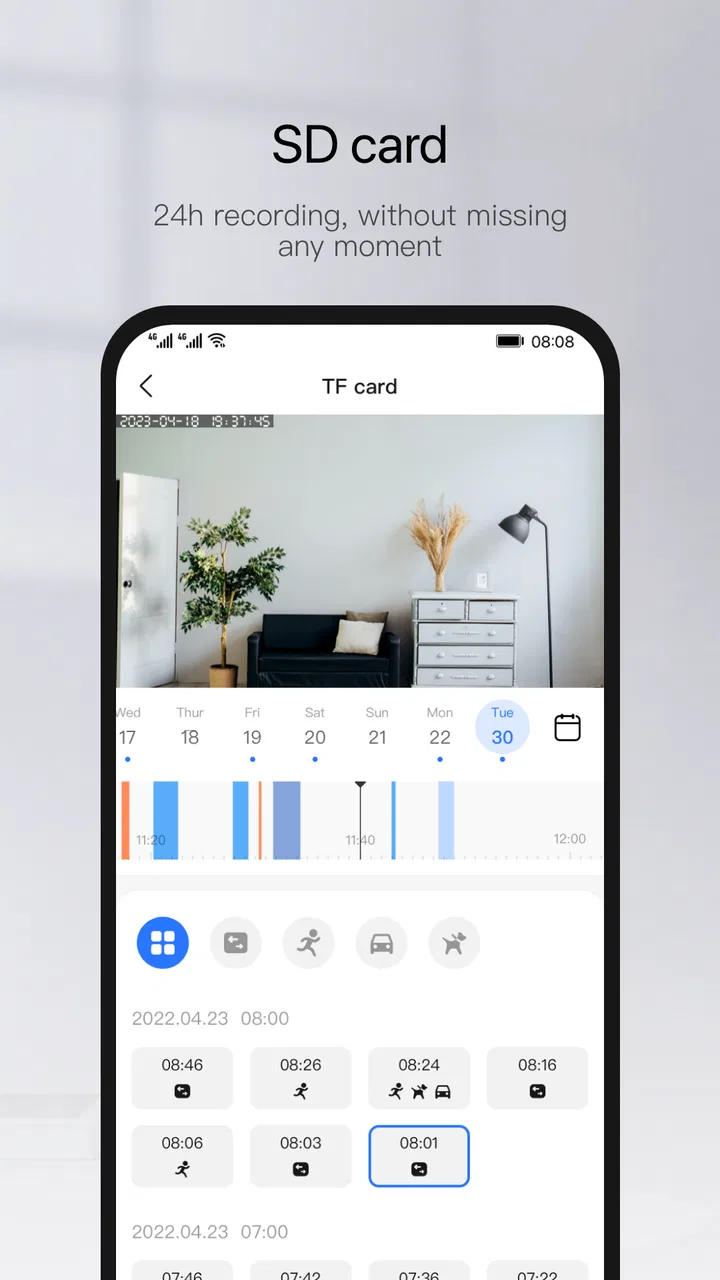
Yoosee is a versatile app designed for smart home management, primarily focusing on security cameras. It allows users to monitor real-time video, record footage, and receive motion detection alerts. The app supports two-way audio communication, enabling live interaction. Additionally, Yoosee offers cloud storage options, ensuring your data is safely backed up and accessible anywhere.
02Is Yoosee compatible with all security cameras?
While Yoosee supports a wide range of IP cameras, it's essential to check compatibility with your specific camera model. The app is generally compatible with Yoosee-branded devices and several third-party cameras that adhere to standard protocols. Always verify with the manufacturer or consult the app's documentation for a comprehensive list of supported devices.
03How secure is the Yoosee app and its data storage?
Yoosee prioritizes user security by implementing encryption protocols for data transmission. It offers both local and cloud storage options for recorded footage. Users should ensure their Wi-Fi network is secure and regularly update the app to the latest version to benefit from ongoing security enhancements and bug fixes.
04Can I access my cameras remotely using Yoosee?
Yes, Yoosee allows remote access to your cameras from anywhere in the world. As long as you have an internet connection, you can view live feeds, control camera settings, and communicate via two-way audio. This feature is ideal for users who want to monitor their property while away from home.
05Are there any subscription fees associated with Yoosee?
The Yoosee app itself is free to download and use. However, if you opt for cloud storage services, there might be subscription fees depending on the storage plan you choose. It's advisable to review the pricing details within the app to understand what services might incur additional charges.
Pros
- User-friendly interface for easy navigation.
- High-quality video streaming and recording.
- Supports multiple device connections.
- Customizable alert settings for motion detection.
- Secure cloud storage option available.
Cons
- Occasional connectivity issues with devices.
- Limited features in the free version.
- Notifications can be delayed at times.
- Requires strong internet for optimal performance.
- Subscription needed for advanced features.

Yoosee
Gallery